
Before You Buy Credits, Try This Opus Clip Alternative
ClutchClip finds the moments worth posting in your long recordings, tells you why it picked each one, and never counts your minutes. Here's how it compares with Opus Clip.
The short version
- One recording in ClutchClip becomes a full set of finished posts: captioned clips in tall and wide, animated graphics, a thumbnail, quote cards, written posts, and a calendar, with built-in YouTube upload and one-click AI editing.
- ClutchClip never counts your minutes: $2.50 a week, $65 a year or $200 once, as many clips as you want, and the first 5 are free (prices checked November 27, 2026).
- Opus Clip charges 1 credit per minute of video it processes, whether or not you clip those minutes, and monthly-plan credits expire after 60 days.
- Opus Clip fits better if you only clip in a browser or on a phone.
Recording more won’t get you seen. Posting what you already recorded will, and your next month of posts is already sitting in the episodes and streams on your computer. ClutchClip turns one recording into a week of captioned clips for Shorts, Reels and TikTok, each with its post already written. Record once, post everywhere, and see how many posts were hiding in your last one.
Quick answer: ClutchClip is the Opus Clip alternative that turns one recording into a full set of finished posts: captioned Shorts, Reels and TikToks in vertical and wide, animated graphics, a highlights reel, a thumbnail, quote cards, written posts for every platform, and a posting calendar with built-in YouTube upload. You can also connect your own AI assistant in one click with zero AI fees. Make as many clips as you want for $2.50 a week, while Opus Clip charges a credit for every minute it processes. Your first 5 clips are free.
We make ClutchClip, so we’re biased; here’s how we compared. We looked at what you get from one recording and how much of the work is left to you. We also looked at what a year costs and where your files go. Prices checked November 27, 2026, on each company’s own pages.
Posting every day from one recording is possible now
You finished a great episode on Sunday, and now the real work starts: hours scrubbing back through the recording for the good parts, typing every word into captions, re-cropping every clip so nobody’s head gets cut off, then exporting each one twice and writing a post for every app. By the time one clip is ready, your whole night is gone, and there are still five more moments in that file waiting their turn.
That’s why posting every day has always looked like a job for creators with an editor or a team. Look at the shows that keep turning up in your feed, though. A lot of what you see is clips: half a minute from a long episode, captioned and cut tall for a phone. What you’re watching is one recording doing a whole week’s worth of work.
ClutchClip puts your recordings to work the same way, and it takes that whole night of editing off your plate. Here’s what it hands back.
What ClutchClip does with one recording
One recording goes in. Here’s everything that comes back, and how little of it is left for you to do.
| The job | Who does it |
|---|---|
| Record the episode, stream or call | You (already done) |
| Find the moments worth posting, labeled by opening hook with plain reasons | ClutchClip |
| Keep the ones you like | You |
| Cut them, caption them and, with one switch, trim the ums and dead air | ClutchClip |
| Frame them sharp and tall for Shorts, Reels and TikTok, and wide for YouTube | ClutchClip |
| Add animated text and 6 ready-made motion graphics in your brand colors and font | ClutchClip |
| Even out the sound to the level the big apps play at | ClutchClip |
| Make a thumbnail and quote cards from what you said | ClutchClip |
| Copy the pacing of a video you love, or hand the whole campaign to your own AI assistant (Claude Desktop, Claude Code, Codex, or Antigravity) in one click | ClutchClip + your AI (zero AI fees) |
| Line up written posts on your calendar, with direct YouTube upload built in | ClutchClip (YouTube uploads straight from your computer; other apps ready to paste) |
You do two things: you record, and you choose. Everything in between is the job ClutchClip takes off your hands, all inside one app, with no separate editing program to learn. That leaves one fair worry: will the clips look good enough to post?
Clips that look like you hired an editor
Think about the last clip that stopped your thumb. The words landed on screen as they were said, the speaker filled the frame, and it looked like someone had put real time into it. That’s the kind of clip ClutchClip hands back. We ran a NASA recording through it: the wide shot on the left went in, and the tall clip on the right came out, captions and all.
 The wide recording
The captions are part of the video, so they play wherever the clip goes, even on a phone with the sound off. You pick the look: clean block captions, words that land one at a time, karaoke captions that light up as each word is said, or animated styles that hit the important words hardest. Want to reach Spanish speakers too? ClutchClip translates the captions on your computer. Turn on both shapes, and every clip comes out tall for Shorts, Reels and TikTok and wide for YouTube, from one export. On a paid plan there’s no watermark, and you can swap the ClutchClip end card for your own or switch it off, so the only name on the clip is yours.
Your vertical clips stay sharp, too. Follow the speaker switches to the new person the moment the camera cuts and keeps captions at two lines so they never cover a face. On top of that, you get 6 ready-made animated graphics templates (lower thirds, title cards, stat callouts, quote pops, and end cards), a brand file for your colors and fonts, and the option to save the pacing of a video you love and apply that style to your own footage with one-click Undo.
It works on the conversations you record, too. Here’s a podcast clip, straight out of ClutchClip.
You can watch all eight clips from that one NASA recording on the homepage. If you already have a clip that only needs words on it, here’s how to add captions without uploading it.
You choose what goes out
Every moment ClutchClip suggests comes with an opening-hook label (like Story start, Question, Hot take, Myth busted, or Surprising number), a plain reason it made the list, and the exact line that was said. You can preview each one, add it or reject it, and nothing exports until you say so. The clips that go out are the ones you picked.
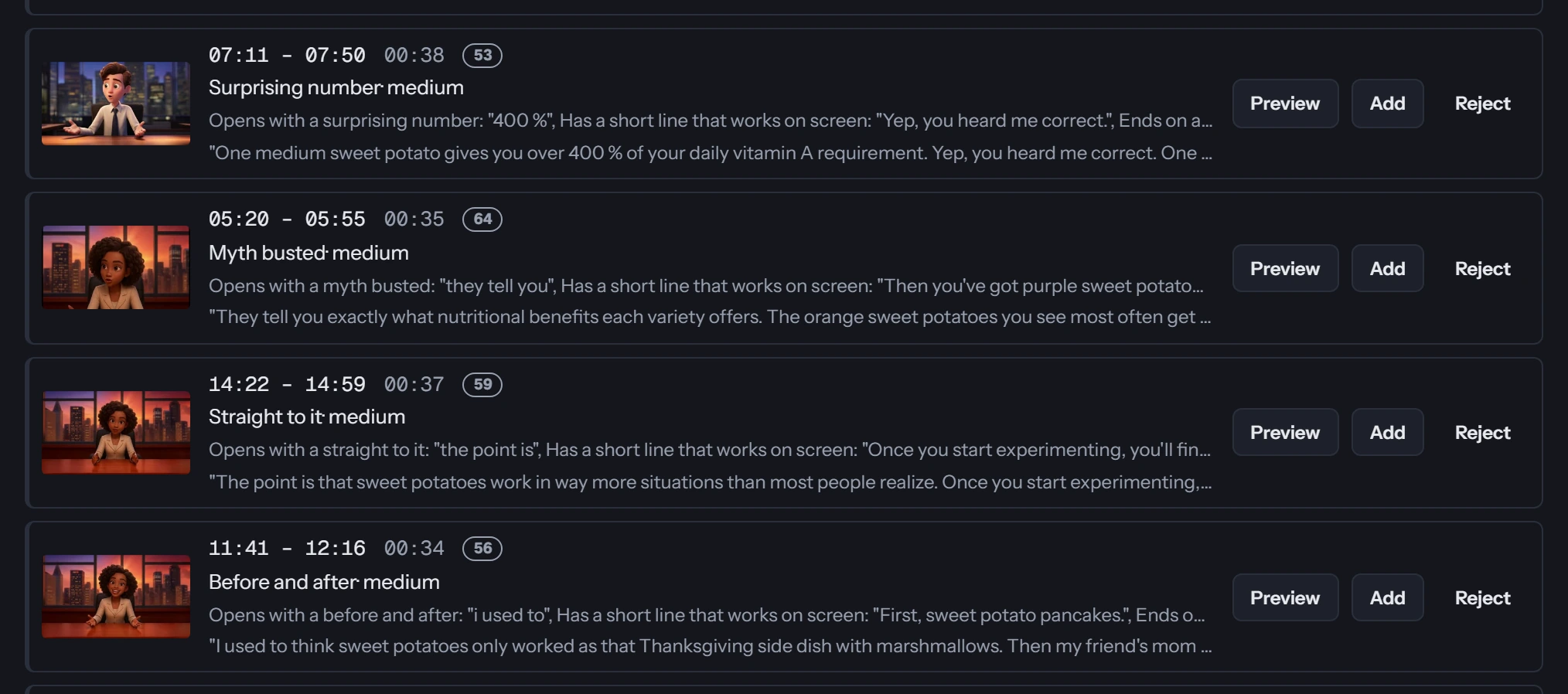
Want to see how a moment gets picked before you install anything? Paste a transcript into the free Podcast Clip Finder, right in your browser, and it shows you the moments worth clipping, each with its reason.
That covers one recording. The next question is what it costs when you record a lot more than one.
Every recording, every week, with no meter
Say it’s a big week. You record Monday’s episode, a live stream on Wednesday, and a long call with a guest on Friday. Drop all three into ClutchClip, make every clip you want from them, and the price doesn’t move: $2.50 a week, $65 a year, or $200 once for lifetime. A slow week costs the same, and nothing you paid for runs out while you’re busy.
I built ClutchClip so clipping wouldn’t run on a meter: make as many clips as you want, without paying for more credits in a busy month or watching unused ones go to waste in a slow one.
Getting started asks very little of you:
- You don’t need to know how to edit. You pick clips from a list, and ClutchClip does the cutting.
- Hand the edit to your own AI assistant, with zero AI fees. Connect Claude Desktop, Claude Code, Codex, or Antigravity in one click and let it build campaigns, pull from your local b-roll folders, and render batches on your computer. ClutchClip never charges AI credits on top of your plan.
- It runs on the computer you already record on, Windows or Mac. An NVIDIA graphics card speeds up the transcribing, but you don’t need one.
- One license covers two computers, so your desktop and your laptop both come along.
- Your recordings stay with you. Your recordings are processed on your PC and never uploaded on their own; you only send a clip when you choose to post it.
The first step costs nothing. Your first 5 clips are free with no card, and they’re the real thing: captioned exports with no watermark, ending with a short ClutchClip outro. If you buy a plan and change your mind, every plan has a 14-day refund.
Now hold that up against how Opus Clip charges.
Opus Clip pricing: why creators look for an Opus Clip alternative
Before you buy credits, know what one actually buys. Opus Clip charges 1 credit for every minute of the original video you import. A 60-minute episode costs 60 credits when you submit the whole thing. The slow intro, the sound check, the twenty minutes that went nowhere: you pay for those minutes too, unless you trim them off before you submit.
On the plans, Starter is $15 a month for 150 credits, and Pro is $29 a month for 300. Process the full 60 minutes and keep five one-minute clips, and you’ve paid for 60 minutes to post 5. The other 55 minutes are billed all the same.
Here’s what one episode a week uses in a month of about four episodes. These are worked examples, not quotes:
| One episode a week | Credits in a month | Covered by |
|---|---|---|
| 30 minutes | about 120 | Starter (150 credits) |
| 60 minutes | about 240 | Pro (300 credits) |
| 90 minutes | about 360 | More than Pro’s 300 |
Have a slow month? On a monthly plan, unused credits expire after 60 days, and the credits you paid for and never used are gone. (Yearly-plan credits last 12 months.)
The free plan won’t carry you far either. You get 60 processing minutes a month, a watermark on your exports, vertical only, and your files expire after 3 days. One hour-long episode uses up the whole month.
Over a year, paying monthly comes to $180 for Starter and $348 for Pro. Pro also has a yearly plan, which Opus says gives credits at a 50% discount compared with monthly. ClutchClip is $65 a year, or $200 once, and it never counts a minute. Prices checked November 27, 2026.
| ClutchClip | Opus Clip | |
|---|---|---|
| How it charges | Flat: $2.50 a week, $65 a year or $200 once | Credits: 1 per minute of video imported |
| Free to try | 5 full clips, no card | Free plan: 60 minutes a month |
| Watermark | None on paid exports (trial clips end with a short outro) | On free-plan exports |
| Tall and wide | Both from one export, every plan | 9:16 on Free and Starter; 9:16, 1:1 and 16:9 on Pro |
| Why a moment was picked | 14 opening-hook labels, a plain reason, and the line that was said, every plan | A Virality Score (0 to 99) on Starter and Pro |
| Bring your own AI assistant | One-click connect (Claude, Codex, Antigravity), zero AI fees | Not supported (runs inside Opus Clip's web app) |
| Posting | Calendar and reminders; posts to YouTube for you | Posts to YouTube, TikTok and Instagram on Starter; posts and schedules to 9 platforms on Pro |
| Where it runs | Your Windows or Mac computer | Your web browser |
Opus Clip does a lot well, and for some creators it’s the better pick.
When Opus Clip might fit you better
Opus Clip could suit you more if any of these sound like you:
- You clip on a phone, a tablet or a Chromebook. Opus Clip works in a browser, and ClutchClip needs a Windows or Mac computer.
- You want nothing to install. A browser tool means no download and no updates.
- You want a score as a second opinion. Starter and Pro give each clip a Virality Score based on its hook, flow, value and trend.
- You want posts to go out on their own across many platforms, or a shared space for a team. That’s what Opus Clip Pro is built for.
If those aren’t your priorities, the recording already on your computer is a good place to start.
Your recordings are waiting
Think about the folder where your recordings live. Every file in there is a conversation you showed up for, with lines people would stop scrolling for, and right now nobody new gets to hear them. Drop the last one into ClutchClip tonight, keep the moments you like, and tomorrow starts with captioned clips, animated graphics, a thumbnail, quote cards and a post for every platform, ready to line up on your calendar. Make as many as you want, starting with 5 clips free. Recording more won’t get you seen. Posting what you already have will.
Frequently asked
Is Opus Clip free?
Opus Clip has a free plan with 60 processing minutes a month. Free-plan exports carry a watermark, they're 9:16 only, and your files expire after 3 days. Paid plans start at $15 a month (checked November 27, 2026).
Is there a free Opus Clip alternative?
CapCut has a free online AI tool that finds highlights in a long video. ClutchClip gives you 5 full clips free with no card: real captioned exports with no watermark, ending with a short ClutchClip outro.
Can I make clips without uploading my video?
Yes, with ClutchClip. Your recordings are processed on your PC and never uploaded on their own; you only send a clip when you choose to post it. Activation, updates, and optional features still use an internet connection.
Does ClutchClip work on a Mac?
Yes. ClutchClip is a desktop app for Windows and macOS (macOS 11 or newer), and one license covers two computers, such as a desktop and a laptop.
Does ClutchClip post my clips for me?
ClutchClip builds your clips, captions, animated graphics, written posts for every platform, and a posting calendar with reminders. On YouTube, connect your channel and confirm a post to upload straight from your computer. Other platforms stay lined up on your calendar, ready to paste.
How we compare and test
Everything we say about ClutchClip is checked against the shipping build on Windows and macOS. If it is on this site, it works in the app. Competitor facts come from the vendor's own public pricing and feature pages, are quoted with the date we checked them, and are re-checked before each update to this page. We do not run affiliate links, and we say plainly where a competitor is the better fit. Spot something stale?Tell usand we will fix it and re-date the page.
Sources
- OpusClip Help: How are credits consumed?, verified 27 November 2026
- OpusClip: pricing page, verified 27 November 2026
- OpusClip Help: Plans and credits, verified 27 November 2026
- OpusClip Help: Virality Score, verified 27 November 2026
- CapCut: long video to shorts, verified 2 November 2026
Last updated .